
Rodrigo Gobbi
Some software experiments ;)

Last month I read something about Kernel Selftests, a subject I had never heard of. Those tests were created to exercise some code paths inside the Kernel and they can also be used to detect regression during future versions. I was curious about it and initially I was intending to run that at my personal machine but tests could generate instabilities or side effects during the system usage, so I’ve changed my mind and I was looking for a VM for that purpose.
Instead using the VirtualBox, I remember about QEMU, a versatile emulator and virtual machine for many architectures and since I’ve never played with that before directly, I’ve decided to use it.
Environment:
The selftests are located at the Kernel source tree, at tools/testing/selftests/ folder. You need to clone that and ideally, be running the same kernel version in your system. I’ve used a release candidate version (kernel_source/Makefile):

After building the Kernel, we could use the bzImage (Kernel compressed image binary) through QEMU CLI but we don’t have a file system available to interact with the system (actually, Kernel won’t boot without it…). So, I’ve used the Buildroot platform to create a FS with utilities and dependencies plus the Kernel image. In that way, we could interact with the system and achieve our goal, run the Kernel Selftests. I’ve used some pieces of a nice instructions file at here (very straightforward if you are not used to Buildroot).
After making everything, we’ll have the artifacts at images/ path of Buildroot, just need to use them:
# mount the rootfs created by buildroot, we'll install the selftests there
sudo mount -o loop /opt/buildroot_topdir/build_cfg_files/buildroot/images/rootfs.ext2 /opt/buildroot_topdir/build_cfg_files/buildroot/root_loop
# install selftests but a disclaimer: this is not very correct because
# I didn't use the kernel folder at buildroot for building the test binaries.
# Also, the tools to build them (gcc, etc) would not be the same.
cd <linux_repo_outside_of_buildroot>/tools/testing/selftests
sudo mkdir -p /opt/buildroot_topdir/build_cfg_files/buildroot/root_loop/tests
sudo ./kselftest_install.sh /opt/buildroot_topdir/build_cfg_files/buildroot/root_loop/tests
sudo umount /opt/buildroot_topdir/build_cfg_files/buildroot/root_loop
Running:
Now we need to use the artifacts generated by Buildroot. QEMU has a CLI very powerful, we could append lines to the Kernel cmdline, use ramdisk rather a pure FS, etc. In order to boot that system, we should do something like this:
# a few notes:
# 1) nographic option gives a feeling like minicom/picocom, very nice.
# 2) both -hda and -drive seems to work, not sure the underlying differences regarding the disk image
# but for this test, that is not very important
qemu-system-x86_64 -kernel /opt/buildroot_topdir/build_cfg_files/buildroot/images/bzImage -nographic -append "root=/dev/sda console=ttyS0" -hda /opt/buildroot_topdir/build_cfg_files/buildroot/images/rootfs.ext2 -m 12G
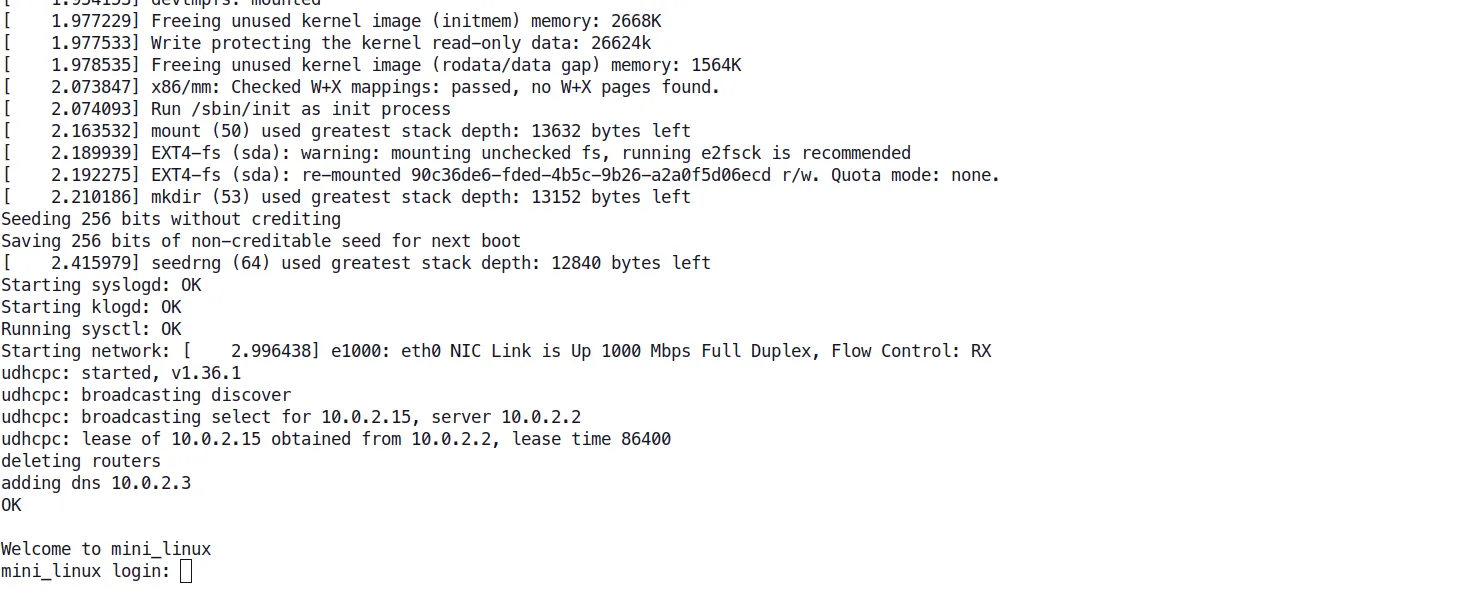
The system will looks like this:
Running tests:
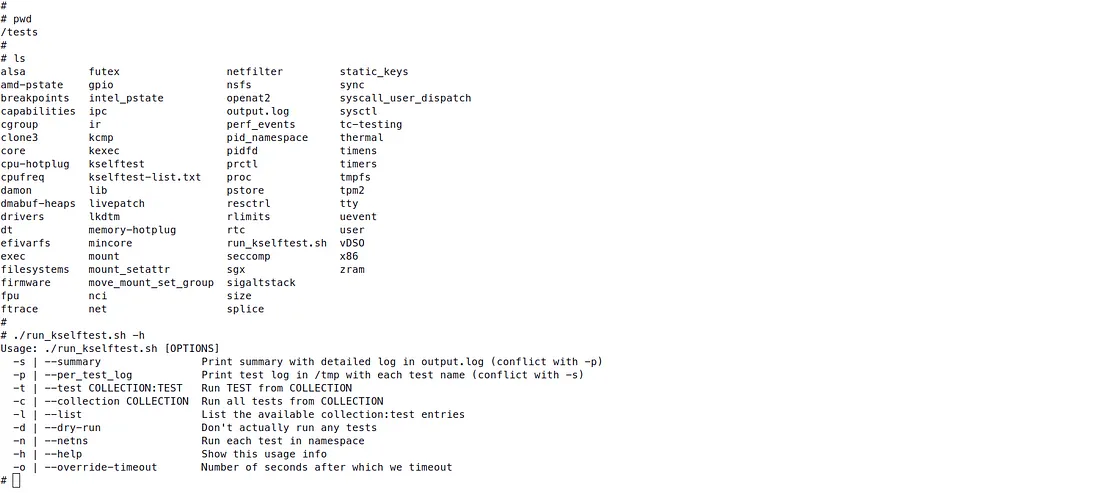
I’ve played around using the full suite of tests, generating the following results:
# run the entire suite
./run_kselftest.sh -s
// failed and skipped tests:
# # Totals: pass:108 fail:2 xfail:0 xpass:0 skip:0 error:0
# # Totals: pass:0 fail:1 xfail:0 xpass:0 skip:0 error:0
# # Totals: pass:50 fail:1 xfail:0 xpass:0 skip:0 error:0
# # Totals: pass:0 fail:2 xfail:0 xpass:0 skip:1 error:0
# # Totals: pass:56 faii:4 xfail:0 xpass:0 skip:70 error:5
# # Totals: pass:0 fail:21 xfail:0 xpass:0 skip:0 error:0
# # Totals: pass:0 fail:8 xfail:0 xpass:0 skip:0 error:0
# # Totals: pass:0 fail:4 xfail:0 xpass:0 skip:0 error:0
# # Totals: pass:1 fail:6 xfail:0 xpass:0 skip:0 error:0
# # Totals: pass:0 fail:1 xfail:0 xpass:0 skip:0 error:0
# # Totals: pass:0 fail:1 xfail:0 xpass:0 skip:0 error:0

// passed and skipped tests:
# # Totals: pass:3 fail:0 xfail:0 xpass:0 skip:2 error:0
# # Totals: pass:91 fail:0 xfail:0 xpass:0 skip:5 error:0
# # Totals: pass:6 fail:0 xfail:0 xpass:0 skip:3 error:0
# # Totals: pass:11 fail:0 xfail:0 xpass:0 skip:1 error:0
# # Totals: pass:0 fail:0 xfail:0 xpass:0 skip:0 error:0
# # Totals: pass:0 fail:0 xfail:0 xpass:0 skip:0 error:0
Some tests were failing because some options for this Kernel were not enabled (menuconfig), others were failing because there are missing tools that weren’t enabled at Buildroot. Didn’t check all of the other failures, maybe I’ll do that in the future or maybe I will use a LTS version of the Kernel to compare the results.
Yet, the purpose was to use QEMU, and he proved to be a very powerful alternative to VirtualBox.
edit: I’ve reduced a large amount of errors, but there are still tests failing. The configs are here.